Choosing a Medicare drug plan can feel like a lot. There are many plans, each with its own drug list, pharmacies and prices, and the right one for your neighbor may not be right for you. This guide walks you through finding and enrolling in a Part D plan on Medicare.gov, one screen at a time. If you would rather not do it alone, I'm glad to go through it with you.
It's about standalone Part D plans, which go with Original Medicare. Many Medicare Advantage plans already include drug coverage. If you have one, read Common Mistakes to Avoid before you enroll in anything.
Step-by-Step: How to Enroll in a Medicare Part D Plan
Step 1: Make a list of your medications and your pharmacy
Before you open the website, write down each drug you take: its name, strength, how often you take it, and whether it's brand or generic. Include medications you take only some of the year. Note the pharmacy you use, and any others you would be willing to use.
Have your Medicare card handy too. You'll need your Medicare number to enroll.
Step 2: Check your enrollment dates
Between October 15 and December 7, anyone with Medicare can join, switch or drop a Part D plan. A change made in that window starts January 1. If you're newly eligible, you have a seven-month window around your 65th birthday. Some life events, such as moving, open a window at other times.
Step 3: Open the Medicare Plan Finder
Go to Medicare.gov/plan-compare (opens in a new tab). Choose the year you need coverage for and enter your ZIP code. You can log in to see your saved information, or continue without logging in.
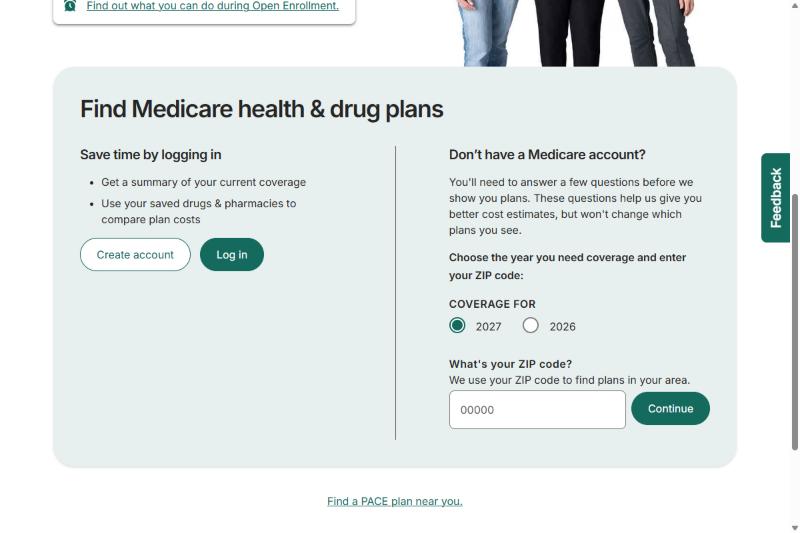
Step 4: Choose "Medicare drug plan (Part D)"
The next screen asks what type of plan you want to see. Pick Medicare drug plan (Part D), then select Find plans. It may ask whether you get help paying for your Medicare costs. Answer for your own situation, or choose "I don't get help from any of these programs."
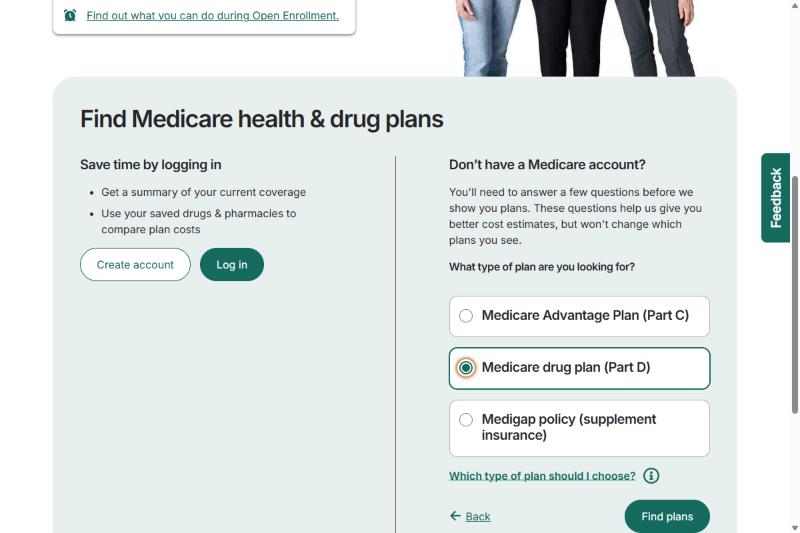
Step 5: Add your drugs
Choose "Yes, include drug costs." Then start typing the name of your first medication in the search box and pick it from the list that appears. Select Add.
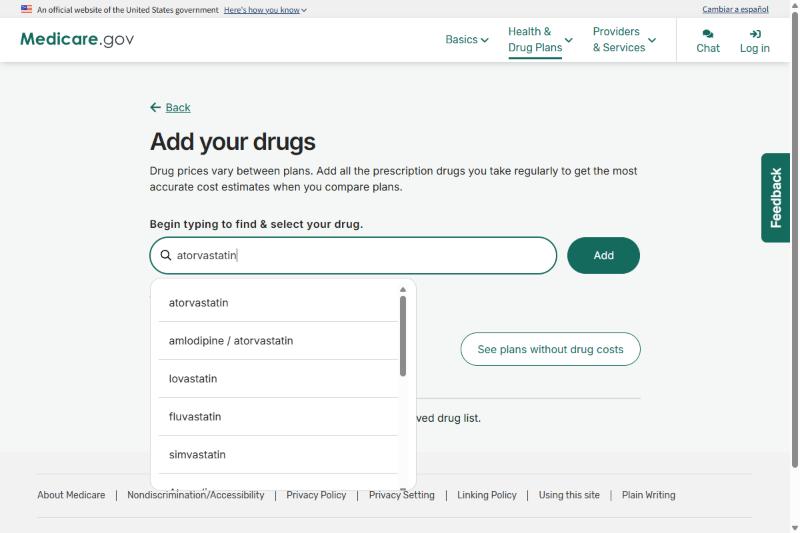
Step 6: Enter the dose, quantity and how often you take it
Choose the strength you take, how many you get at a time, and how often you fill it. Then select Add to my drug list. Repeat this for every medication. A missing drug makes every cost estimate wrong.
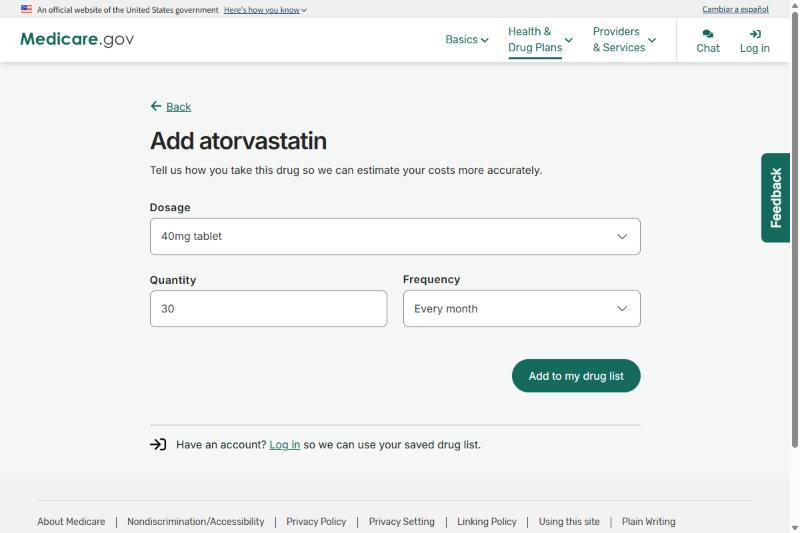
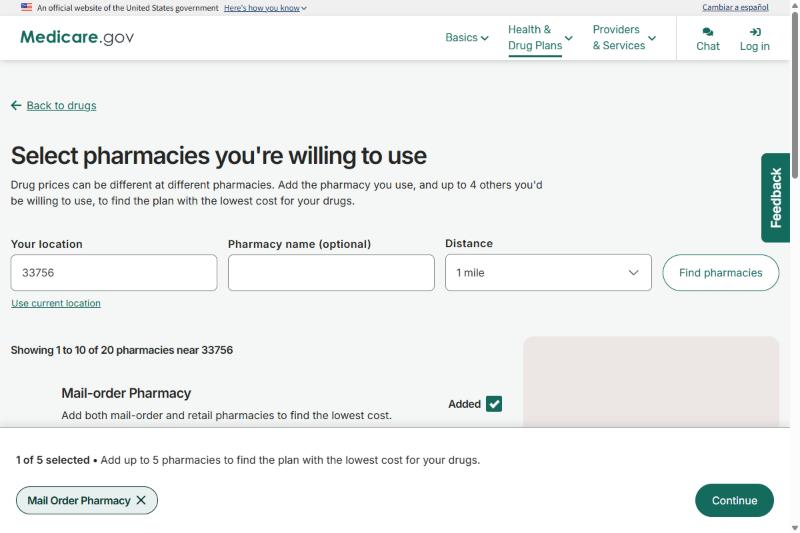
Step 7: Choose your pharmacies
Enter your ZIP code or use your location and select your pharmacy. You can add up to five. Add the one you use and any others you would be willing to use, including mail order if that appeals to you. The Plan Finder then shows costs at each one.
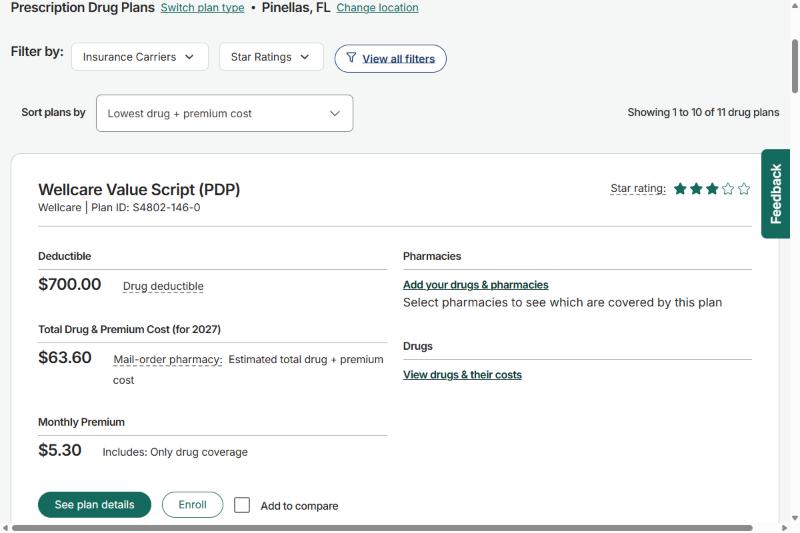
Step 8: Compare plans by total cost, not just the premium
You'll see a list of plans. Sort them by Lowest drug + premium cost. For each plan, look at the Total Drug & Premium Cost for the year, not just the monthly premium. A low premium can still cost more over a year if your drugs are expensive on that plan.
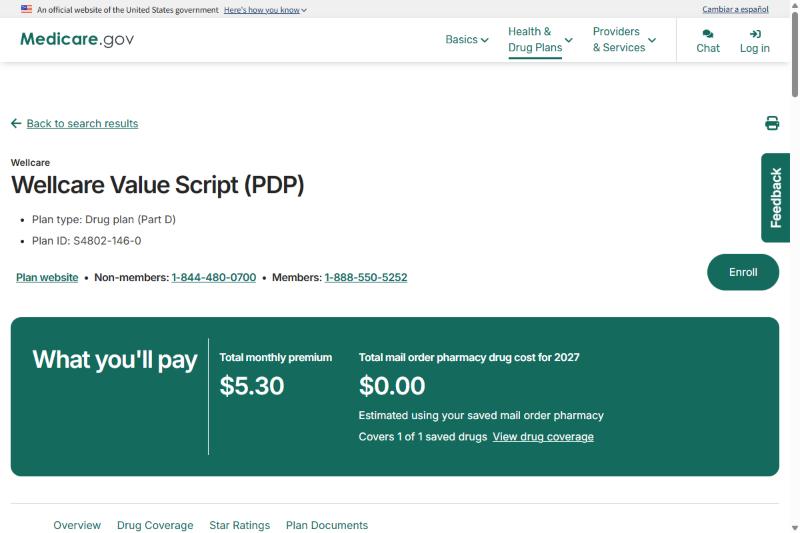
Step 9: Open the plan details
Select See plan details for any plan you're considering. The top of the page shows What you'll pay: the monthly premium and your estimated drug cost. Use View drug coverage to confirm your drugs are covered. When you're ready to join, the Enroll button is at the top right.
Step 10: Check the estimated costs and your pharmacy's network status
Scroll to the drug coverage section. It lists your drugs, shows whether each pharmacy is in the plan's network, and shows your estimated costs for the year. Look for Preferred and In-network next to your pharmacy.
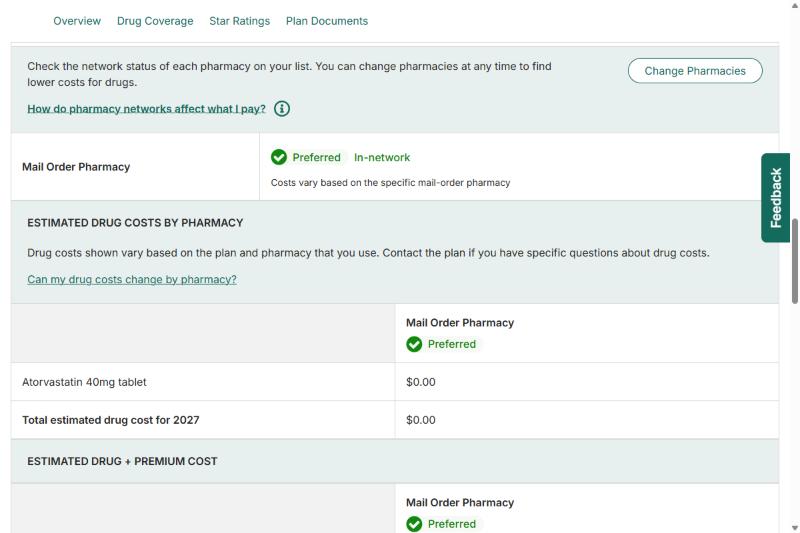
Keep scrolling to see your estimated total for the year, and the limit on what you can pay out of pocket. For 2027, Medicare says you won't pay more than $2,400 out of pocket for covered Part D drugs.
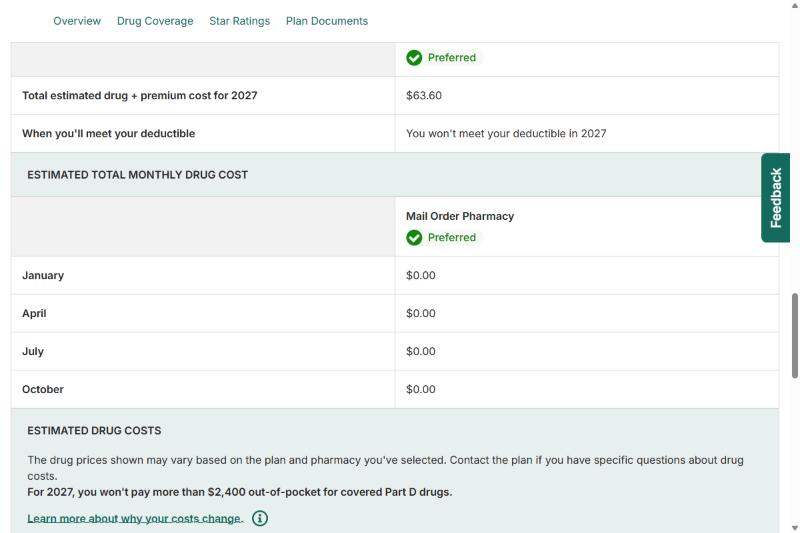
Step 11: Check the plan's rules for your drugs
For each of your drugs, look at which tier it's on, and whether the plan requires prior authorization (approval first), step therapy (trying another drug first) or has quantity limits. These rules can affect whether you can get a drug when you need it, even if it's technically covered.
Step 12: Enroll, and confirm it
You can enroll through the Plan Finder, directly with the plan, by calling 1-800-MEDICARE, or with an agent. Have your Medicare number ready. Joining a new standalone plan cancels your old one, so you don't need to cancel it separately. Afterward, look for a confirmation and your new member ID card, and keep using your old plan until the new one starts.
Would you like help going through this?
There is no charge for our help. Tell me about your medications and your pharmacy, and I'll compare the Part D plans we offer. A plan costs the same whichever way you enroll.
Common Mistakes to Avoid
- Choosing on premium alone. The cheapest premium may put your drugs on a high tier or leave them uncovered. Compare the total yearly cost.
- Skipping the pharmacy check. The same drug can cost different amounts at different pharmacies, even under the same plan.
- Joining a standalone plan while in Medicare Advantage. If you have a Medicare Advantage HMO or PPO plan and join a standalone Part D plan, you can be dropped from your Advantage plan and moved to Original Medicare. Check with the plan or call 1-800-MEDICARE before you enroll.
- Missing the deadline. If you go 63 days or more without drug coverage that is at least as good as Medicare's, a late-enrollment penalty can be added to your premium for as long as you have Part D.
Two Ways to Lower Your Drug Costs
Extra Help. Medicare's Extra Help program can lower your premium, deductible and copays if your income and resources are within the limits. You can apply through the Social Security Administration at SSA.gov (opens in a new tab).
Medicare Prescription Payment Plan. Part D plans offer a payment option that spreads your out-of-pocket drug costs across the year in monthly amounts, instead of all at the pharmacy. Ask your plan how to opt in.
FAQs
Do I need Part D if I don't take any medications?
If you don't have other drug coverage that is at least as good as Medicare's, joining when you are first eligible helps you avoid a late-enrollment penalty later. Many people choose a low-cost plan to protect themselves.
Can I change plans in the middle of the year?
Generally not. The main window is October 15 to December 7. Some life events, such as moving out of your plan's area or losing other coverage, open a Special Enrollment Period.
What if a drug I need isn't covered?
You can ask your plan for an exception, and your doctor can help by explaining why you need it. You can also compare other plans during the next enrollment window.
Does Medicare Advantage include Part D?
Many Medicare Advantage plans include drug coverage. If yours does, you generally don't need a separate Part D plan.
How do I know if my current plan is still the best fit?
Re-enter your medications and pharmacy in the Plan Finder each fall and compare your plan's estimated total cost with the others. Plans change every year, even if your health doesn't.
Official Sources
- Medicare Plan Finder (opens in a new tab)
- Medicare.gov (opens in a new tab) or call 1-800-MEDICARE
- Social Security: Extra Help with drug costs (opens in a new tab)
- CMS.gov (opens in a new tab)
Related Guides
- Medicare Advantage in Tampa Bay, explained
- Medicare Supplement (Medigap) in Tampa Bay, explained
- Medicare 101: a plain-English guide
- Free download: Medicare, made simple (PDF guide)
- Turning 65 and Medicare: an enrollment guide